

---
title: Enterprise
description: Add BitSignal to the way you do business by supplying each employee with a digital business card. Utilize cohesive branding, user management, and more.
---

# BitSignal Enterprise

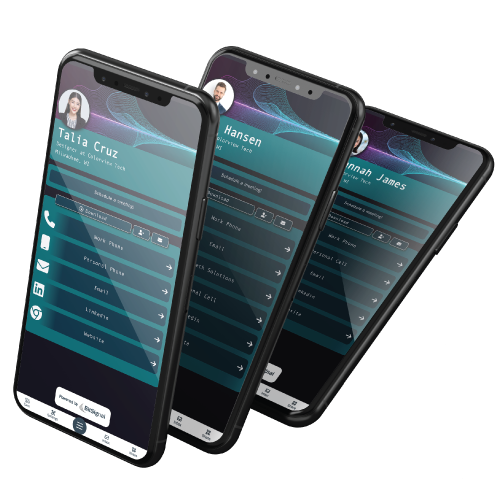
From managing individual accounts to creating teams, from creating a cohesive, brand-forward look to in-depth analytics, BitSignal Enterprise is an all-in-one tool to ensure your customers have access to *all *of the information they need from anywhere across your full organization.

[ Get Started ](https://mybitsignal.com/sign-up-for-enterprise?hsLang=en)

![BitSignal Enterprise Profiles With Cohesive Branding](https://mybitsignal.com/hubfs/Enterprise-Same-Theme-Different-Profiles-Image-Transparent.png)

## Digital Business Cards For Your Entire Organization

BitSignal Enterprise makes it easy to bring your entire business to the future of networking. BitSignal Enterprise includes all of the features in BitSignal Pro, with an all-new dashboard and additional features, like:

#### User Management

Add and remove users at any time, add users to groups organized by department or organization, create account managers and admins, all while staying in control of each individual's information and customization.

#### Full Analytics

Your Enterprise dashboard shows your account admins a full collection of analytics, from individual performance to number of button clicks to group performance and more.

#### Cohesive Brand Image

Use your company's branding across each and every profile, customizable down to the department, group, or individual designed by you or in-house by our top-notch graphics team.

#### And More:

- Unlimited Custom Buttons
- Scheduling
- Messaging
- Motion Backgrounds
- NFC Business Cards for Each User
- Downloadable Contact Information

# How Can You Use BitSignal Enterprise?

BitSignal Enterprise keeps your business cohesive and approachable. Using BitSignal Enterprise, you can display your employee's and businesses' current information across every department and individual profile while proudly displaying your branding. Add the profile to your employee's email signature, add it to the company socials, and distribute it with the tap of a card. 

[ Learn More ](https://mybitsignal.com/bitsignal-featured-blog?hsLang=en) [ Start here ](https://mybitsignal.com/sign-up-for-enterprise?hsLang=en)

![BitSignal Enterprise for Your Business](https://mybitsignal.com/hs-fs/hubfs/80105883_l_normal_none.jpg?height=2000&name=80105883_l_normal_none.jpg)

## Manage Groups and Departments

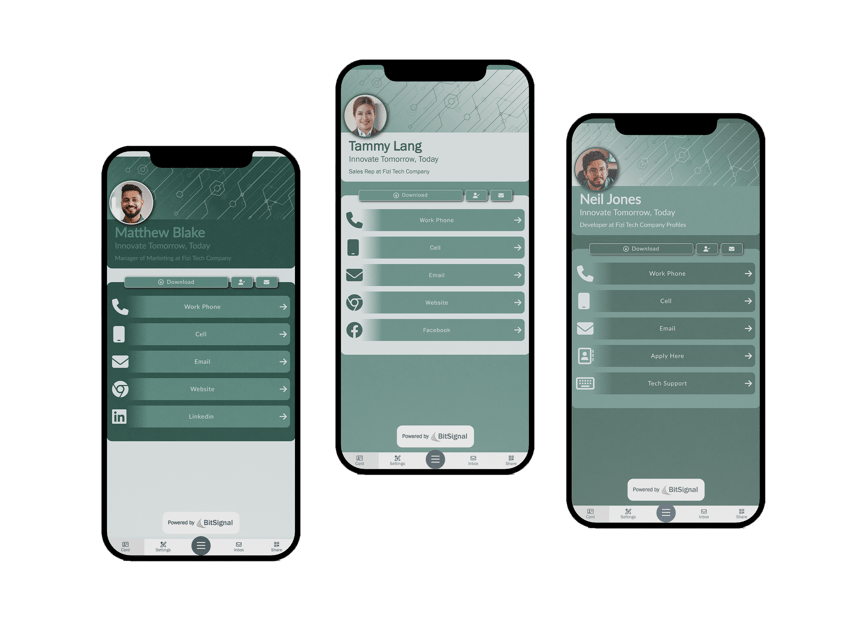
Track department performance and manage user permissions through Bitsignal Groups. Sort employees into Groups by department, organization, or position, and use your groups to adjust what their profiles display, what they can edit, and more.
[ Learn More About Groups ](https://mybitsignal.com/bitsignal-featured-blog/managed-unmanaged-groups-what-you-need-to-know?hsLang=en)

![Unique Brand Profiles for Every Department](https://mybitsignal.com/hs-fs/hubfs/Three-Profiles-Fizi-Tech-Company-2.png?width=855&name=Three-Profiles-Fizi-Tech-Company-2.png)

## Set Admins and Managers

Give managers and leadership Enterprise permission to keep your Enterprise account clean, cohesive, and current. It's user management made easy!

[ Learn More About Admins & Managers ](https://mybitsignal.com/bitsignal-featured-blog/the-difference-between-enterprise-admins-and-managers?hsLang=en)

![Digital Enterprise Business Cards for Leadership and Employees](https://mybitsignal.com/hs-fs/hubfs/image%20(46).png?width=855&name=image%20(46).png)

## Your Custom Dashboard

Everything you need to run a successful BitSignal Enterprise account, all in one dashboard.

- View Account Analytics
- Add and Manage Users
- Create and Manage Groups
- Customize Profiles and Branding
- View Relevant Blogs & Articles
- And More!

![Custom Enterprise Dashboards for Each Business](https://mybitsignal.com/hs-fs/hubfs/image%20(47).png?width=855&name=image%20(47).png)

## Learn More About Enterprise

[![](https://mybitsignal.com/hs-fs/hubfs/Admins%20and%20Managers%20(1)%20(1).png?width=1200&height=500&name=Admins%20and%20Managers%20(1)%20(1).png) ](https://mybitsignal.com/bitsignal-featured-blog/the-difference-between-enterprise-admins-and-managers?hsLang=en)

3 min read.

## [The Difference Between Enterprise Admins and Managers](https://mybitsignal.com/bitsignal-featured-blog/the-difference-between-enterprise-admins-and-managers?hsLang=en)

![Picture of Blake Woog](https://mybitsignal.com/hs-fs/hubfs/Untitled%20design%20(73).png?width=50&name=Untitled%20design%20(73).png) 

[Blake Woog](https://mybitsignal.com/bitsignal-featured-blog/author/blake-woog?hsLang=en) 

 Aug 14, 2023 12:03:48 PM

 BitSignal Enterprise is loaded with ways to customize the way your business is represented down to...

[![](https://mybitsignal.com/hs-fs/hubfs/Managed%20%26%20Unmanaged%20(2)-1.png?width=1200&height=500&name=Managed%20%26%20Unmanaged%20(2)-1.png) ](https://mybitsignal.com/bitsignal-featured-blog/managed-unmanaged-groups-what-you-need-to-know?hsLang=en)

3 min read.

## [Managed & Unmanaged Groups: What You Need to Know](https://mybitsignal.com/bitsignal-featured-blog/managed-unmanaged-groups-what-you-need-to-know?hsLang=en)

![Picture of Blake Woog](https://mybitsignal.com/hs-fs/hubfs/Untitled%20design%20(73).png?width=50&name=Untitled%20design%20(73).png) 

[Blake Woog](https://mybitsignal.com/bitsignal-featured-blog/author/blake-woog?hsLang=en) 

 Aug 9, 2023 9:31:14 AM

 BitSignal Enterprise was built for businesses of all sizes. This means supplying your whole team...

## Frequently Asked Questions

##### How do I sign up for BitSignal Enterprise?

BitSignal Enterprise is a per-user subscription, so the total fee will be different for every business. To inquire about creating a BitSignal Enterprise account, [contact sales](https://mybitsignal.com/sign-up-for-enterprise?hsLang=en) to find an estimate!

##### Can you design my Enterprise themes?

We can help create a series of branded profiles for your BitSignal Enterprise account. This addition can be negotiated while setting up your account.

##### How do I add or remove users from my Enterprise account?

In your Enterprise dashboard, click 'Manage Users' and click 'Add User' to add an employee, or click on the employee in question and click 'Delete Employee' to remove them. 